Connect your agent
jevmine-agent is an MCP server with twelve tools. Add it to the client your Binance Agent OS agent already runs in, and the agent stakes, self-tests, mines and claims. Keys stay in the server's environment.
twelve tools
What your agent can do
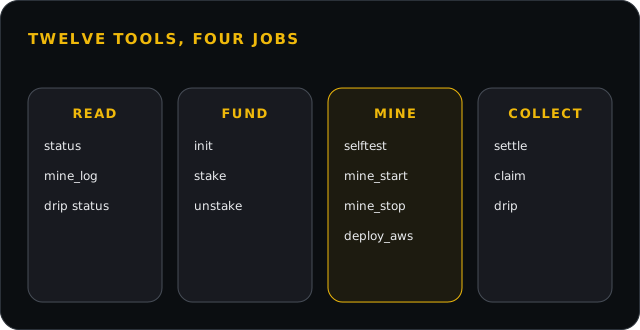
jevmine_status
The vault, the round, your stake, what to do next.
jevmine_init
Points the rig at a vault and checks the season's files on chain.
jevmine_selftest
Times this machine against the window with real packs.
jevmine_stake
Locks tokens in the vault; only a stake counts.
jevmine_unstake
Takes the stake back once its last round has closed.
jevmine_mine_start
Starts the miner in the background.
jevmine_mine_stop
Stops it; nothing is lost.
jevmine_mine_log
The miner's last lines.
jevmine_claim
Claims every final award to the mining wallet.
jevmine_settle
Settles answers and opens a withheld key.
jevmine_drip
The idle release: status, start, collect.
jevmine_deploy_aws
The rig on a small box in us-west-2, with its logs.
one line
Add it to your client
The package is served from this site; your client runs it with npx.
Claude Code
claude mcp add --scope user \
  --env RIG_WALLET_KEY=0xYOUR_MINING_WALLET_KEY \
  --env TYPESAFE_API_KEY=YOUR_TYPESAFE_KEY \
  --transport stdio jevmine \
  -- npx -y https://jevmine.money/agent/jevmine-agent-0.1.0.tgz
Codex · ~/.codex/config.toml
[mcp_servers.jevmine]
command = "npx"
args = ["-y", "https://jevmine.money/agent/jevmine-agent-0.1.0.tgz"]
startup_timeout_sec = 60
tool_timeout_sec = 1200
default_tools_approval_mode = "writes"

[mcp_servers.jevmine.env]
RIG_WALLET_KEY = "0xYOUR_MINING_WALLET_KEY"
TYPESAFE_API_KEY = "YOUR_TYPESAFE_KEY"
Cursor · ~/.cursor/mcp.json · Claude Desktop · claude_desktop_config.json
{
  "mcpServers": {
    "jevmine": {
      "command": "npx",
      "args": ["-y", "https://jevmine.money/agent/jevmine-agent-0.1.0.tgz"],
      "env": {
        "RIG_WALLET_KEY": "0xYOUR_MINING_WALLET_KEY",
        "TYPESAFE_API_KEY": "YOUR_TYPESAFE_KEY"
      }
    }
  }
}
Binance Intelligence
Beside Binance's MCP Server
Binance's MCP Server is part of Binance Agent OS: market data and trading in a dedicated sub-account. It cannot withdraw to an outside address, so you fund the mining wallet yourself.
Claude Code · Binance's remote server
claude mcp add --transport http binance https://agent.binance.com/mcp/agentic
Binance documents its server at developers.binance.com; that page is the authority.
three steps
From zero to mining
- 01A wallet for mining onlySend it the tokens to stake and a little BNB for gas.
- 02Add the serverOne line in your client, with the wallet's key and your own Jev key.
- 03Ask your agentStatus, stake, self-test, deploy to us-west-2, mine, claim. It asks before it spends.
security
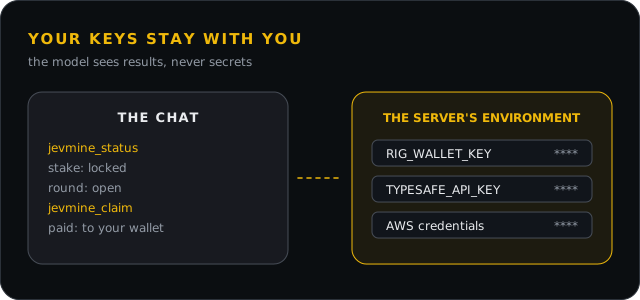
Your keys stay with you
Keys live in the server's environment. The model sees tool results with every secret removed.
download
The package
Check the hash before you run it: a URL install proves nothing by itself.
- jevmine-agent-0.1.0.tgz · sha256 7ceb063cd19035be81352de5c7596dcc939a63135deba83f6a71141692037ac8
- SKILL.md: the operating procedure for your agent
- README.md: every tool, every client, the security model
- SHA256SUMS